Account-field reference
4rabet Registration Guide for India
Independent explanation of publicly documented 4RABET registration fields, account verification, personal-data risks and India-related account considerations.
Registration Interface Overview
This page explains fields and checks that have appeared in public registration guides. It does not provide a registration service or link to an operator account-opening page.
Reviewed public material shows that the registration interface has been presented as an account-creation panel with identity and preference fields. The important editorial distinction is between a field that appeared in a historical screenshot and a current account-opening route. This guide records the former and does not provide the latter.
The source screenshot reviewed for this page contained both useful field evidence and marketing content. The published crop keeps the field structure while removing account-action and bonus elements, so the image supports identification without functioning as a prompt.
Fields Observed in Public Screens
Public guides have described email, phone, password, country-code and currency elements in relation to 4RABET registration. Some screenshots also included promotional selectors, which are not reproduced as calls to action here.
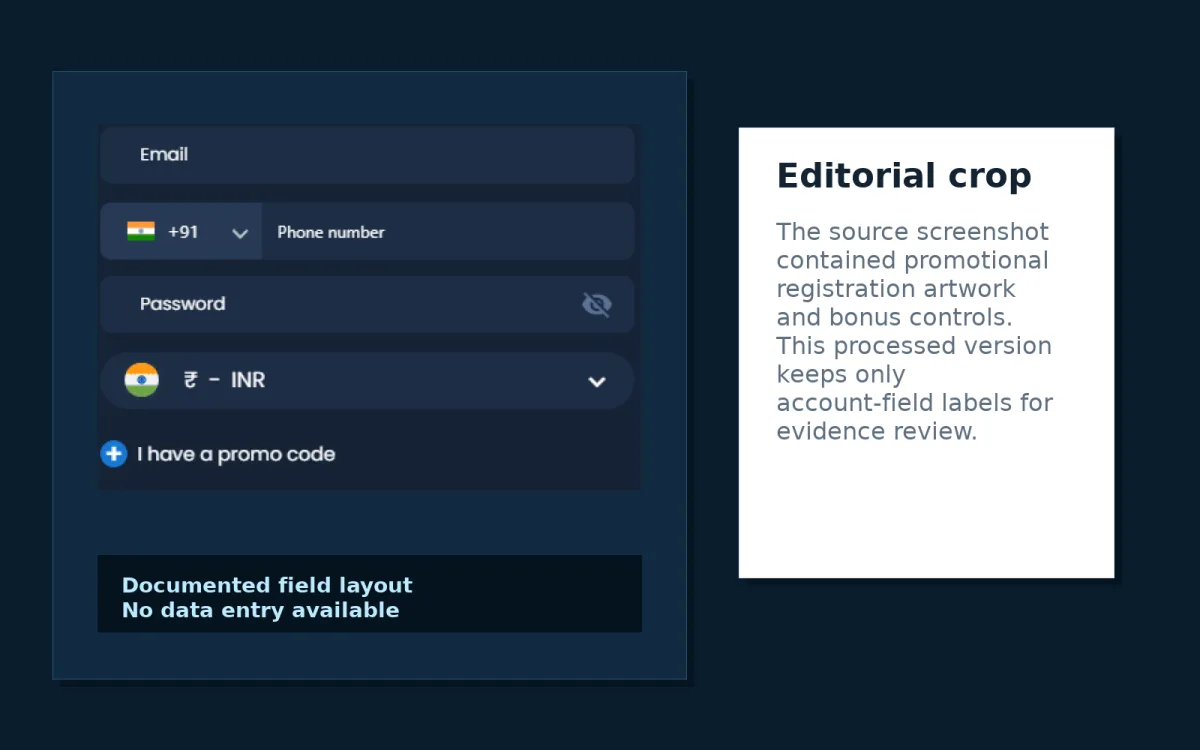
| Field | Evidence | Source status | Sensitivity |
|---|---|---|---|
| Visible in public registration screen | Observed | High | |
| Phone number | Visible with country-code selector | Observed | High |
| Password | Visible in public registration screen | Observed | High |
| Currency | INR visible in reviewed screen | Historical reference | Medium |
| Promo code | Visible in reviewed screen | Historical reference | Low |
| Bonus selector | Visible in source screenshot but removed from this guide | Historical marketing element | Not reproduced |
| Identity documents | Described in verification guides | Reported | Very high |
Static Field Diagram
The diagram below is a non-interactive editorial layout. It contains no form fields, no submit action and no account-processing function.
KYC and Personal-Data Considerations
Third-party verification guides have described checks that may involve full legal name, date of birth, address, government identity document, payment ownership review and source-of-funds questions. These data points are sensitive and can be misused if sent to the wrong recipient.
Before uploading any document to an external service, check the exact upload domain, read the privacy notice, avoid Telegram or WhatsApp document requests, and consider adding a purpose watermark to any copy you submit to a verified platform. Do not send passports, PAN details, Aadhaar images, bank statements or screenshots to the editorial address on this website.
Document requests can also expose metadata. File names, camera timestamps and unredacted document corners may reveal more than the minimum required details. If a verified service requires an upload, keep a private record of the date, the visible upload domain and the purpose stated at the time.
Source Verification
The registration screenshot used here is treated as a historical interface reference. It shows field placement and labels, while promotional material in the same original image was removed from the editorial crop. A historical field label does not prove that registration is currently available, legally accessible in India or offered under the same verification process.
When reading a third-party guide, check whether it gives a publication date, whether screenshots match the text, whether payment or bonus claims are presented as current, and whether the page links to account routes. This website avoids operator route links and keeps registration information descriptive.
The same approach applies to currency labels. INR appearing in a historical registration screen is recorded as a historical reference, not as confirmation that INR accounts, deposits, withdrawals or real-money games are currently available to India-based users.
Source verification also means checking what the image does not show. A registration panel rarely displays the full privacy policy, KYC sequence, withdrawal conditions or current regional restrictions in the same frame.
Clone and Phishing Warning
Lookalike pages often copy colours, logo placement and account-field wording. Treat the following as warning signs:
- Misspelled hostname or unusual extra words in the domain.
- Newly registered lookalike domains shared in a group chat.
- Login forms opened from messaging apps instead of a verified bookmark.
- Requests for OTP, recovery code or remote screen access.
- Requests to pay an account-unlocking fee.
- Requests to download files from unverified domains.
Cloned registration pages often create urgency by claiming that an account must be verified immediately or that access will be lost without a fee. That pressure is itself a warning sign. Slow down, preserve evidence and avoid sending further personal data until the source is independently confirmed.
Related Guides
Last fact review: